Top Magento SEO issues and how to fix them for better rankings
Magento is widely recognized as one of the most powerful and flexible e-commerce platforms available. However, that complexity often leads to significant search engine optimization challenges—issues that are frequently uncovered during a Magento SEO audit. If left unaddressed, these problems can result in duplicate content, crawl budget waste, and poor user experiences, all of which suppress your visibility in search engine results pages (SERPs).
Below are the top Magento SEO issues store owners most commonly face, along with a deep dive into why they matter and how to resolve them in Magento 2.
Duplicate content from layered navigation URLs
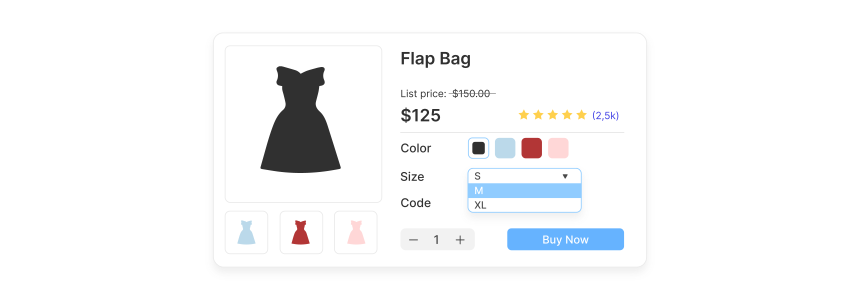
Layered navigation is a cornerstone of the Magento user experience, allowing shoppers to filter products by color, size, price, or brand. However, it is also one of the most significant sources of duplicate content in the e-commerce world.
Why it is an issue
Magento generates a unique URL for every possible combination of filters. For example, a "Shoes" category might generate hundreds of variations like shoes.html?color=red, shoes.html?size=10, and shoes.html?color=red&size=10. From a search engine's perspective, these are often seen as separate pages with identical or near-identical content. This dilutes ranking signals because Google does not know which version of the page is the "authoritative" one to rank.
Common symptoms
URLs containing parameters like ?color=red or ?price=100-200 appearing in Google Search Console.
Multiple indexed pages displaying the exact same list of products.
"Keyword cannibalization," where different filter pages compete against each other for the same search term.
How to fix
Set rel="canonical" for filtered pages: Ensure that filtered pages point back to the main category URL as the master version.
Block filter parameters in robots.txt: If you have thousands of filter combinations that provide no SEO value, use the robots.txt file to prevent crawlers from accessing URLs containing specific parameters.
Use noindex, follow for non-SEO filter combinations: For filters that users need but search engines don't (like "Price" or "Sort By"), apply a noindex tag while allowing the crawler to follow the links to products.
Enable Canonical Link Meta Tag for Categories: Navigate to Stores → Configuration → Catalog → Catalog → Search Engine Optimization and set Use Canonical Link Meta Tag for Categories to Yes.
Missing or incorrect canonical tags
Canonicalization is the process of telling search engines which version of a URL is the primary one. In Magento, a single product or category can often be reached via multiple paths, leading to confusion for search bots.
Why it is an issue
Without proper canonical tags, Google may treat product URLs with tracking parameters, sorting options, or different category paths as entirely separate pages. This scatters your "link juice" (authority) across multiple URLs rather than concentrating it on one strong page.
Common cases
Tracking parameters: URLs appended with ?utm_source=... or ?gclid=....
Multiple category paths: A product assigned to both "New Arrivals" and "Men's Shoes" might exist at /new-arrivals/product.html and /mens-shoes/product.html.
Pagination and Sorting: Pages sorted by "Price: Low to High" creating new URL strings.
How to fix
Global Canonical Settings: Go to Stores → Configuration → Catalog → Catalog → Search Engine Optimization.
Enable for Products: Set Use Canonical Link Meta Tag for Products to Yes.
Enable for Categories: Set Use Canonical Link Meta Tag for Categories to Yes.
Clean URL logic: Ensure that your canonical tags always point to the "clean" or "short" version of the URL (e.g., domain.com/product-name.html) rather than the version including the category path.
Thin or duplicate category content
Category pages are often the most important landing pages for e-commerce sites because they target broad, high-volume keywords. However, Magento’s default setup often leaves these pages "thin."
Why it is an issue
Many Magento category pages consist solely of a grid of products. Search engines prefer pages that provide unique, helpful information to users. If a page lacks text, search engines may struggle to understand the context and relevance of the products listed. Furthermore, if you copy-paste the same description across multiple categories, you risk a duplicate content penalty.
Typical problems
No category description: Only product names and prices are visible.
Reused descriptions: Using the same "About our brands" text on every brand page.
Poor content placement: Placing text at the bottom of the page where it is less likely to be prioritized by crawlers.
How to fix
Unique Descriptions: Write at least 200–300 words of unique content for every major category.
Keyword Optimization: Include your primary keyword in the first paragraph and use supporting semantic terms (LSI keywords) throughout.
Internal Linking: Use the description to link to subcategories or related blog posts.
Strategic Placement: Use a "Top Description" for a brief 1-2 sentence intro and a "Bottom Description" for more detailed SEO content to keep the user experience clean while still providing crawlable text.
Poor URL structure
A clean, descriptive URL is beneficial for both users and search engines. Magento's default settings sometimes produce "ugly" URLs that are difficult to read and optimize.
Why it is an issue
Long, auto-generated URLs (like those containing IDs) are less likely to be clicked on in search results and can reduce crawl efficiency. Furthermore, deeply nested URLs (with too many subfolders) can signal to Google that a page is less important.
Examples
System URLs: /catalog/product/view/id/123/ instead of /blue-widget.html.
Deep nesting: /category/subcategory/sub-subcategory/product-name.html.

How to fix
Enable Web Server Rewrites: Ensure this is turned on in Stores → Configuration → General → Web → Search Engine Optimization.
Disable category path in product URLs: In the SEO settings under the Catalog menu, set Use Categories Path for Product URLs to No. This keeps product URLs short (e.g., domain.com/product-name.html) regardless of how many categories they belong to.
Manual URL Keys: When creating products or categories, manually set the "URL Key" to be short, lowercase, and keyword-focused, using hyphens to separate words.
Indexation of internal search results
Magento includes a robust internal search feature, but if not managed correctly, it can create a massive "black hole" for your SEO.
Why it is an issue
Every time a user searches for a term on your site, Magento generates a result page with a URL like /catalogsearch/result/?q=search+term. If search engines find and index these pages, they can create thousands of low-quality, "thin" pages. Google specifically recommends against allowing internal search result pages to be indexed.
How to fix
Robots.txt Disallow: Add Disallow: /catalogsearch/ and Disallow: /search/ to your robots.txt file.
Meta Noindex: Ensure that the search result template includes a <meta name="robots" content="noindex, nofollow"> tag.
Avoid Internal Links: Never link to your own search result pages from your homepage or navigation menus. Instead, link to curated category pages.
Pagination and crawl budget waste
For stores with large inventories, pagination is inevitable. However, how Magento handles "Page 2, 3, 4..." can significantly impact how Google crawls your site.
Why it is an issue
Large stores can generate hundreds of paginated pages. If Google spends all its "crawl budget" (the amount of time it spends on your site) crawling page 10 of a minor category, it might miss new product pages or high-priority updates. Additionally, if not handled correctly, paginated pages can be seen as duplicate content of Page 1.
Common mistakes
No canonical strategy: Failing to tell Google whether it should index all pages or just the first one.
Infinite Scroll issues: Implementing infinite scroll without a proper fallback for search bots that cannot "scroll."
How to fix
Canonical to Self or Page 1: There is debate on this, but current best practice is often to have paginated pages canonical to themselves (Page 2 points to Page 2) to ensure all products are discovered, provided the content on those pages is unique enough.
Limit products per page: Balance user experience with crawlability. 24–48 products per page is usually a safe range.
Priority Linking: Use your homepage and main navigation to link directly to your most important categories so crawlers don't have to "click" through ten pages of results to find them.
Slow page speed and Core Web Vitals issues
Google uses Page Speed and Core Web Vitals (LCP, CLS, and INP) as direct ranking factors. Magento is a resource-heavy application, and out-of-the-box installations are often slow.
Why it is an issue
A slow site results in a high bounce rate and lower conversion rates. If your Largest Contentful Paint (LCP) takes longer than 2.5 seconds, or if your page elements jump around (Cumulative Layout Shift), your rankings will likely suffer.
Common causes
Unoptimized images: High-resolution JPEGs that haven't been compressed.
Bloated JavaScript/CSS: Too many third-party extensions loading individual files.
Poor server configuration: Lack of Varnish cache or Redis.

How to fix
Enable Full Page Cache (FPC): Use Varnish for the best results.
Minify and Merge: In Stores → Configuration → Advanced → Developer, enable minification and merging for JS and CSS files.
Adopt WebP: Use an extension to automatically convert images to the WebP format, which is much lighter than PNG or JPEG.
Content Delivery Network (CDN): Use a CDN like Cloudflare to serve static assets from locations closer to the user.
Audit Extensions: Remove any third-party modules that are not essential, as they often add unnecessary scripts to the page head.
Improper handling of out-of-stock products
E-commerce catalogs are dynamic. Products sell out or get discontinued, but how you handle those transitions affects your SEO standing.
Why it is an issue
Simply deleting a product or letting it go to a 404 "Page Not Found" results in a loss of any authority that page had built up. It also creates a frustrating experience for users who might have landed there from a search or a social media link.
Bad practices
404 Errors: Deleting a product without a redirect.
Soft 404s: Keeping a page up that says "Product not found" but returns a 200 OK status.
How to fix
Temporarily Out of Stock: Keep the page live. Ensure the "Add to Cart" button is replaced with an "Out of Stock" message or a "Notify Me" email signup. This keeps the URL indexed and maintains its rank.
Permanently Discontinued: * 301 Redirect: Redirect the old URL to the most relevant replacement product or the parent category.
410 Gone: If there is no replacement, use a 410 status code to tell Google the page is intentionally removed and won't be coming back.
Schema Availability: Ensure your schema markup updates to "OutOfStock" so Google can display this in search results, preventing users from clicking through and bouncing immediately.
Missing or weak structured data
Structured data (Schema.org markup) helps search engines understand the specific details of your products, such as price, availability, and reviews.
Why it is an issue
Without proper schema, you miss out on "Rich Snippets." Rich Snippets make your search result look much more attractive with star ratings and price info, which significantly increases your Click-Through Rate (CTR).
Common gaps
Missing Product Schema: Google cannot see the price or rating in a structured format.
Incorrect Availability: Showing a product as "In Stock" in search results when it is actually sold out.
No Breadcrumb Schema: Losing the clean navigation path in the SERPs.
How to fix
Implement Comprehensive Schema: Ensure your theme includes markup for Product, Offer, AggregateRating, and BreadcrumbList.
Use the Google Rich Results Test: Periodically test your product URLs in Google's official tool to ensure there are no errors or warnings.
Dynamic Updates: If you use an extension for schema, ensure it pulls data dynamically so that price changes or stock updates are reflected in the code immediately.
Poor internal linking structure
Internal linking is how you distribute authority throughout your site. Magento’s default hierarchy can sometimes create "silos" where deep pages receive no internal link equity.
Why it is an issue
If a product or subcategory is only linked from a deep paginated page, search engines may deem it unimportant. A flat, well-linked structure helps Google crawl your site faster and understand which pages are your "pillar" content.
Typical problems
Deep product pages: Products that are "four clicks away" from the homepage.
Orphan pages: Pages with no internal links pointing to them.
Generic anchor text: Using "Click Here" instead of keyword-rich descriptions for links.
How to fix
Related Products/Cross-Sells: Use Magento’s built-in related products feature to create links between similar items.
Breadcrumbs: Ensure breadcrumbs are enabled and correctly marked up with schema. They provide a clear path back to categories.
Blog-to-Store Linking: If you have a blog, link from your articles directly to relevant products and categories using descriptive anchor text.
HTML Sitemap: While XML sitemaps are for bots, a well-organized HTML sitemap in the footer can help both users and bots find your main categories and subcategories.
Summary: Core Magento SEO risk areas
Optimizing a Magento 2 store is an ongoing process of balancing technical efficiency with content quality. The most critical risk areas involve duplicate content management (via canonicals and layered navigation control) and performance optimization (Core Web Vitals). By systematically addressing these ten issues, you move beyond the "out-of-the-box" limitations of Magento and create a store that is built to rank.
A successful Magento SEO strategy is not just about fixing errors; it is about providing search engines with a clear, fast, and structured path to your most valuable products.


Nhận xét
Đăng nhận xét